
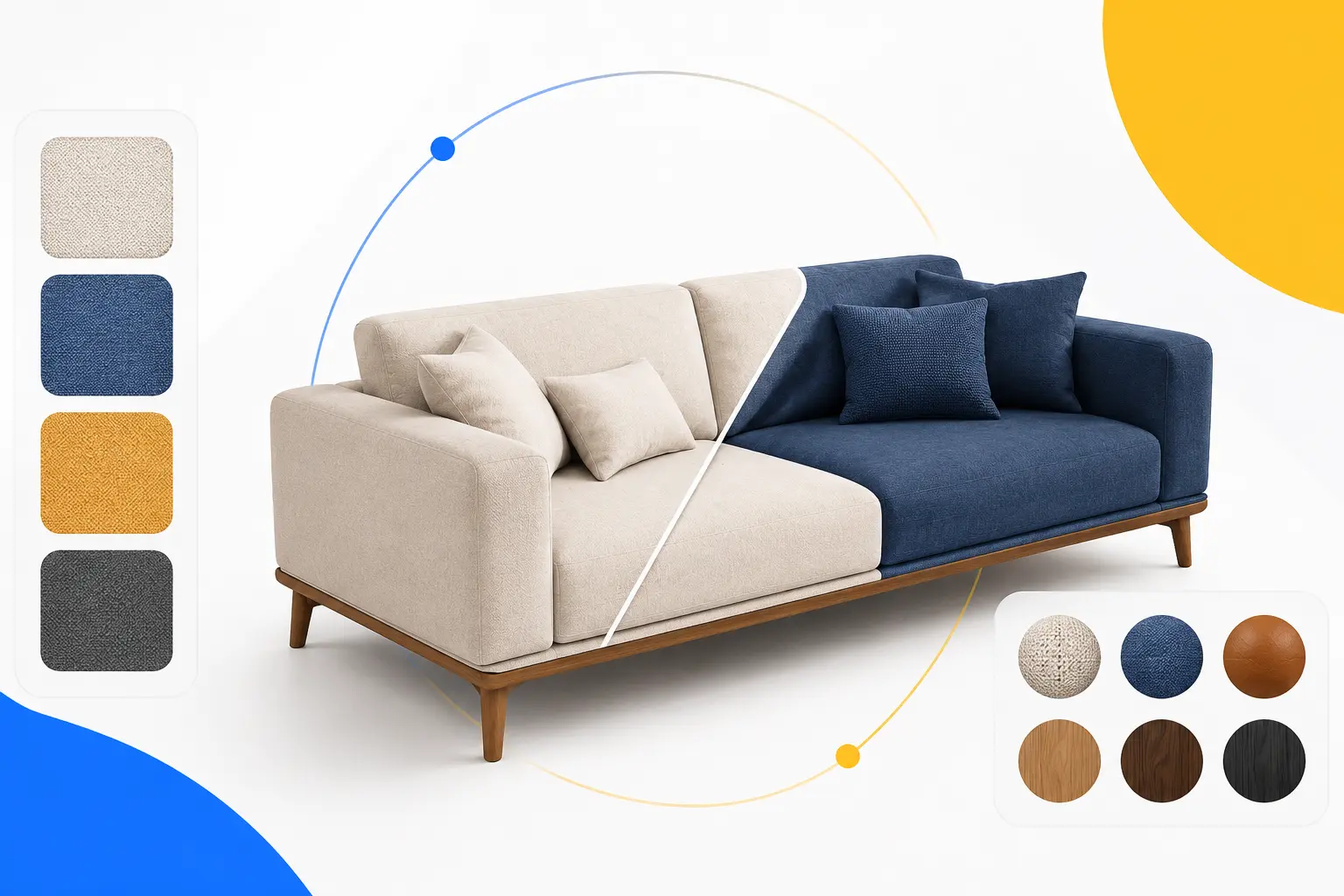

Why It Matters
Modern furniture buyers expect personalization. They want to see exactly what they’re purchasing before placing an order. Interactive 3D product variants make this possible by giving shoppers confidence in their choices while helping brands reduce production costs and simplify catalog management.
As demand for product customization continues to grow, configurable 3D assets are becoming an essential part of modern furniture e-commerce rather than a competitive advantage.
Why Furniture Brands Are Replacing Traditional Photography
Traditional product photography has long been the standard for showcasing furniture online. However, as product catalogs grow and customers expect more personalization, photographing every fabric, color, and finish has become expensive, time-consuming, and difficult to scale.
Every new product variation often requires a separate photoshoot, image editing, quality checks, and file management. For furniture brands with hundreds or even thousands of SKUs, this process quickly increases production costs and slows down product launches.
By comparison, a 3D workflow allows brands to create one high-quality master model that supports multiple product variations. Instead of scheduling another photoshoot, teams can simply swap fabrics, materials, finishes, or components digitally while maintaining consistent, photorealistic quality.
Traditional Photography vs. 3D Product Variants
Traditional Photography | Furniture Product Variants in 3D |
Separate photoshoot for every variant | One master 3D model for all variants |
High photography and editing costs | Lower long-term production costs |
Slow product launches | Faster catalog updates |
Difficult to scale | Easily supports hundreds of SKUs |
Static product images | Interactive and configurable models |
Limited customer interaction | Real-time customization and 360° viewing |
Read more about traditional photography vs. CGI
Key Benefits of Switching to 3D Product Variants
Switching to 3D product variants eliminates the need for expensive physical photo shoots for every single color, material, or design option. It lets online stores offer real-time customization, boost buyer confidence with 360-degree interactive views, and cut down product return rates.
Lower Content Production Costs
Instead of photographing every product combination, brands can reuse a single 3D model to display different fabrics, finishes, colors, and accessories. This significantly reduces photography, editing, and asset management costs over time.
Faster Product Launches
New collections can be published as soon as new materials or finishes are added to the configurator. There’s no need to wait for product samples, studio availability, or post-production work.
Consistent Product Images
Lighting, camera angles, and product quality remain consistent across every product page. This creates a more professional shopping experience and strengthens brand consistency.
Better Customer Experience
Interactive 3D models allow shoppers to rotate products, zoom into materials, compare finishes, and personalize furniture before purchasing. This gives customers more confidence in their buying decisions.
Easier Catalog Management
Managing thousands of product images can be challenging. A configurable 3D workflow keeps product assets organized by storing all variations within a single master model, making future updates faster and more efficient.
Key Insight: Every additional physical photoshoot increases production costs, while a reusable 3D model can support new product variants for years with only minor updates.
A Practical Example
Imagine a furniture brand launching a new dining chair available in:
- 8 fabric options
- 5 wood finishes
- 3 leg colors
With traditional photography, the brand would need to create 120 separate product images to showcase every combination.
Using a 3D configurator, a single master model can display all 120 combinations instantly. Customers simply choose their preferred options, and the model updates in real time without requiring additional photography.
Why This Matters for Furniture Brands
Today’s furniture buyers expect more than static product images. They want to personalize products and see exactly what they’ll receive before placing an order.
By replacing traditional photography with configurable 3D assets, furniture brands can reduce operational costs, simplify catalog management, launch products faster, and deliver a modern shopping experience that meets customer expectations.
As product catalogs continue to expand, scalable 3D product variants are becoming an essential investment for furniture manufacturers, retailers, and eCommerce brands.
How Furniture Fabric, Material, and Finish Swaps Work
The foundation of every furniture configurator is a high-quality master 3D model. Instead of creating separate models for every product variation, designers build one accurate digital asset that supports multiple customization options.
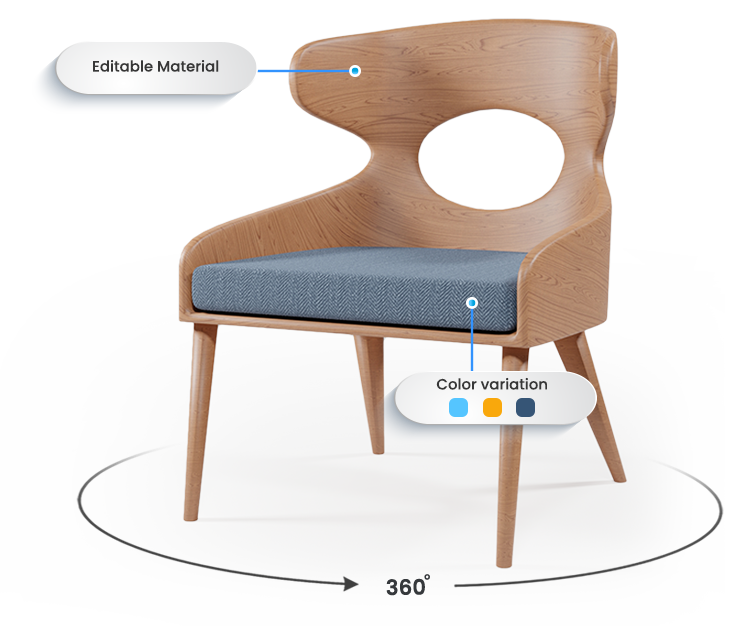
When a customer changes a fabric, wood finish, metal color, or another feature, the configurator updates the existing model instantly. Only the selected material or component changes, while the product’s shape and proportions remain the same. This creates a smooth, realistic experience without requiring a new product page or image.
What Customers Can Customize
Depending on the product, shoppers can personalize a wide range of features, including:
- Upholstery fabrics
- Leather materials
- Wood finishes and stains
- Metal colors and coatings
- Cushion colors
- Tabletop materials
- Leg styles
- Handles and hardware
- Product dimensions
- Modular layouts and accessories
Offering these options allows customers to create a product that matches their style while seeing the result in real time.
How the Material Swap Process Works
Although the experience feels instant to the customer, several steps happen behind the scenes.
Step 1: Create a Master 3D Model
Everything begins with a detailed 3D model that accurately represents the product. This master model serves as the foundation for all future variations.
Step 2: Build a Material Library
Each available fabric, leather, wood finish, or metal coating is created as a digital material using Physically Based Rendering (PBR). These materials replicate real-world textures, colors, reflections, and surface details to produce realistic results.
Step 3: Define Configuration Rules
Not every combination is available for every product. The configurator uses predefined rules to ensure customers only select valid options.
For example:
- Premium leather may only be available on selected sofa collections.
- Walnut finishes may only be offered with solid wood frames.
- Certain leg styles may only fit specific product sizes.
These rules prevent ordering mistakes and simplify manufacturing.
Step 4: Update the Product Instantly
When a customer selects a different option, the configurator replaces only the selected material or component while keeping the rest of the model unchanged.
The update happens in real time, allowing customers to compare different combinations without reloading the page.
Step 5: Display the Final Configuration
Once customization is complete, customers can:
- Rotate the product 360°
- Zoom into fabric and material details
- Compare different finishes
- Save their preferred configuration
- Continue to checkout with the selected variant
This interactive experience gives shoppers greater confidence before making a purchase.
Why High-Quality Materials Matter
A configurator is only as good as its visual quality. Poor textures or inaccurate colors can reduce customer trust and lead to disappointment after delivery.
Using realistic PBR materials helps reproduce:
- Fabric weave and stitching
- Natural wood grain
- Leather texture
- Brushed or polished metal finishes
- Painted and matte surfaces
Accurate materials help customers better understand how the finished product will look in real life.
Key Insight: A successful furniture configurator depends on both a precise 3D model and a well-organized material library. Together, they create realistic product variations that customers can trust.
Example: Configuring a Modern Sofa
Imagine a customer shopping for a three-seat sofa.
They start with a light gray fabric and oak wooden legs. After viewing the product, they decide to explore other options.
Within seconds, they can:
- Switch to dark green velvet
- Replace oak legs with matte black metal
- Change the cushion color
- Add matching accent pillows
- View every change from every angle
Instead of opening multiple product pages or comparing dozens of static images, the customer builds the exact product they want using a single interactive model.
Why Furniture Brands Benefit
Fabric and finish swaps do more than improve the customer experience. They also simplify product management by allowing brands to update materials, launch new collections, and expand product catalogs without creating hundreds of new product images.
As product lines continue to grow, this scalable workflow helps furniture manufacturers reduce content production costs while delivering a faster and more personalized shopping experience.
How a Furniture Product Configurator Works
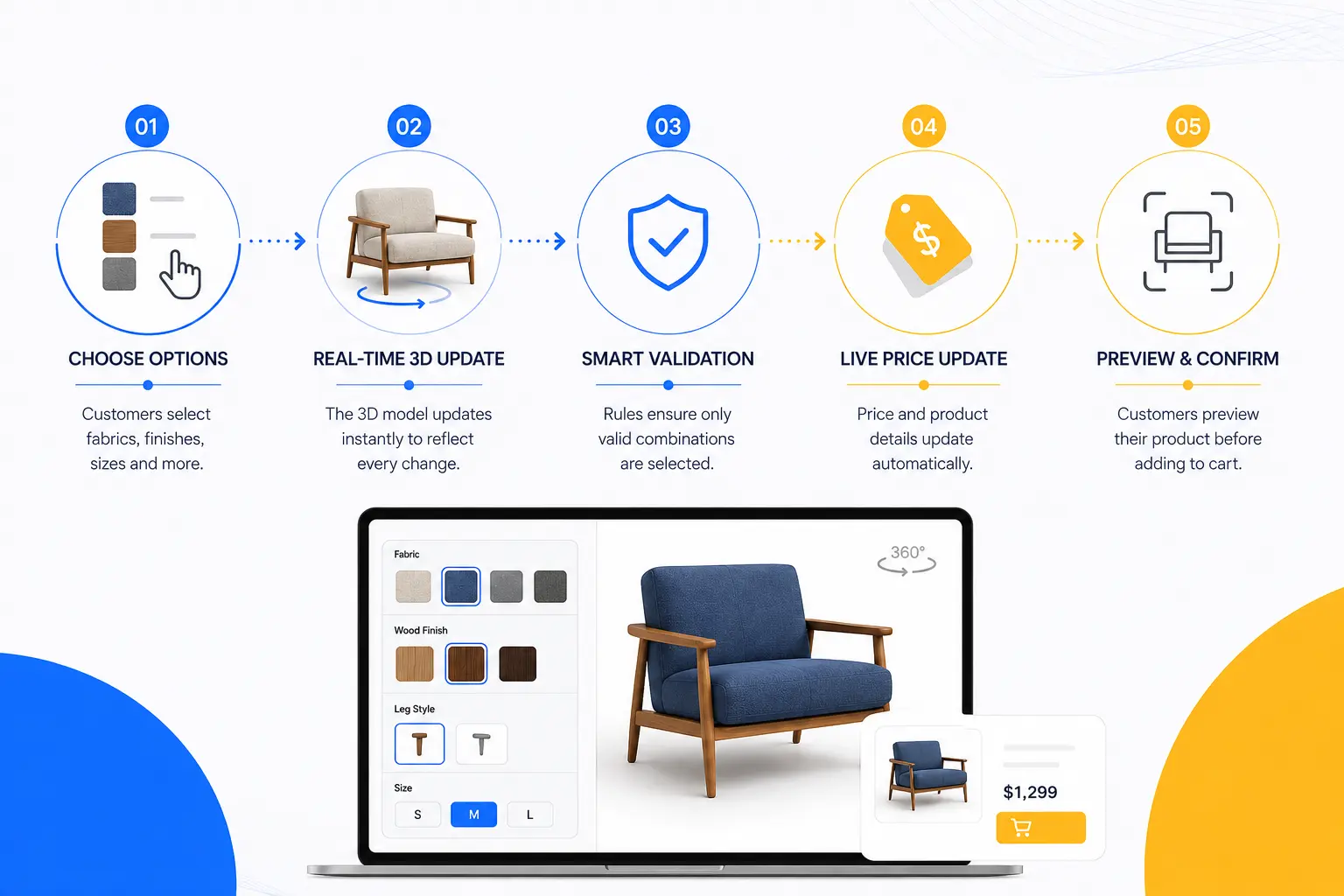
A furniture product configurator transforms a standard product page into an interactive shopping experience. Instead of browsing multiple pages for different colors, fabrics, or finishes, customers can personalize a product in one place and instantly see every change in real time.
Behind the scenes, the configurator combines a master 3D model, a material library, and configuration rules to display only valid product combinations. This creates a smoother buying experience for customers while helping furniture brands manage complex product catalogs more efficiently.
Step 1: Customers Choose Their Preferred Options
The customization process begins when shoppers select the features they want.
Common options include:
- Upholstery fabrics
- Leather types
- Wood finishes
- Metal colors
- Product dimensions
- Leg styles
- Cushion designs
- Handles and hardware
- Optional accessories
As each option is selected, the configurator updates the product instantly without refreshing the page.
Key Insight: A simple and intuitive configurator encourages customers to explore more product combinations, increasing engagement and purchase confidence.
Step 2: The 3D Model Updates in Real Time
Rather than loading a new image for every option, the configurator updates a single master 3D model.
Only the selected material or component changes, allowing customers to compare multiple variations within seconds.
Modern WebGL technology enables these updates directly in the browser without requiring additional software or downloads.
This gives shoppers a smooth experience while reducing the number of product images a brand needs to create and manage.
Step 3: Configuration Rules Prevent Invalid Choices
Not every material or finish is available for every product. To avoid ordering errors, the configurator uses predefined rules that validate every customer selection.
For example:
- Premium fabrics may only be available on selected collections.
- Walnut finishes may only be compatible with solid wood frames.
- Large tabletops may require reinforced leg designs.
- Some accessories may only fit specific product sizes.
These rules ensure customers only configure products that can actually be manufactured, reducing production mistakes and customer support requests.
Step 4: Prices and Product Information Update Automatically
As customers personalize a product, the configurator can automatically update important product information, including:
- Product price
- SKU
- Product code
- Available inventory
- Manufacturing specifications
- Bill of Materials (BOM)
Instead of calculating costs manually, shoppers receive accurate pricing based on their selected options, creating a more transparent buying experience.
Configurator Feature | Business Benefit |
Dynamic pricing | Accurate pricing for every configuration |
Automatic SKU generation | Faster order processing |
Configuration validation | Fewer manufacturing errors |
Live product preview | Higher customer confidence |
Centralized product data | Easier catalog management |
Step 5: Customers Preview Their Product Before Buying
Once customization is complete, shoppers can inspect their product from every angle before placing an order.
Many modern furniture configurators include features such as:
- 360° product rotation
- Zoom for close-up material inspection
- Full-screen viewing
- Augmented Reality (AR) previews
- Saved product configurations
- Easy sharing with family or colleagues
These tools help customers better understand product size, materials, and finishes before making a purchase.
Key Insight: Giving customers a realistic preview of their customized furniture reduces uncertainty and builds confidence in online purchases.
How Furniture Brands Benefit
A furniture configurator does much more than improve product visualization. It also helps brands simplify operations and scale product customization more efficiently.
Key business benefits include:
- Faster product launches
- Lower photography and content production costs
- Easier management of large product catalogs
- Consistent product visuals across every sales channel
- Reduced ordering errors through automated validation
- Better customer engagement with interactive experiences
- Improved confidence during the buying journey
As product catalogs continue to expand, configurable 3D experiences help furniture brands deliver a personalized shopping experience while keeping content production faster, more cost-effective, and easier to manage.
Best Practice
The most successful configurators are built on accurate, reusable 3D assets rather than creating separate models for every product variation. Investing in a well-structured master model and organized material library allows brands to add new fabrics, finishes, and accessories without rebuilding the entire product from scratch.
This approach not only reduces long-term production costs but also prepares furniture brands for future technologies such as AR shopping, virtual showrooms, and AI-powered product recommendations.
Conclusion
Furniture product variants in 3D make it easier for brands to showcase multiple fabrics, materials, and finishes without creating separate images for every option. By using a single configurable 3D model, furniture businesses can reduce content production costs, launch products faster, and deliver a more interactive shopping experience.
As customer demand for personalization continues to grow, investing in configurable 3D assets is a smart way to stay competitive and scale your product catalog efficiently.
If you’re looking to create high-quality, configurator-ready 3D furniture models, Orbe3D can help you build realistic, scalable assets tailored for modern eCommerce and product customization.
Try It Free-No Credit Card Required.
Frequently Asked Questions
- What are furniture product variants in 3D?
They are interactive 3D models that display multiple product options from one master model. - What can customers customize?
Fabrics, materials, finishes, colors, dimensions, and hardware. - Why use 3D instead of product photos?
One 3D model can replace hundreds of product images, saving time and cost. - Can one 3D model support multiple variants?
Yes. A single model can display hundreds of product combinations. - Do 3D configurators work with Shopify?
Yes. Many 3D configurators integrate with Shopify and other eCommerce platforms. - Can customers view furniture in AR?
Yes. Many configurators support Augmented Reality (AR) for room visualization. - Do 3D product variants improve online shopping?
Yes. They help customers visualize products better and buy with more confidence. - Which furniture options can be changed?
Common options include fabric, leather, wood finish, metal color, legs, and accessories. - Are 3D configurators suitable for large catalogs?
Yes. They make managing large product catalogs much more efficient. - How do I get started with furniture product variants?
Start by creating a high-quality master 3D model that supports configurable materials and finishes.