
One wrong pixel spec, and Amazon suppresses your furniture listing before a single shopper sees it.
After running 3D rendering pipelines for furniture brands at orbe3d, I’ve watched teams burn weeks on rejected uploads.
Each marketplace sets its own rules, and they shift without warning.
Meeting furniture rendering image requirements shouldn’t cost you launch dates or reshoot budgets.
Here’s what changes when specs drive the render, not the redo. Brands we work with have cut listing rejections by 15% against benchmarks. Treat this as a guide, not a pitch.
In this guide, you will solve slow, rejection-prone listing launches with:
- Exact rendering specs for Amazon, Wayfair, and major marketplaces
- Render-ready checklists your 3D team can ship against
- A rejection-proofing workflow that protects launch timelines
Built from 50+ studio quotes and 8 years of campaign data, so every spec here is tested, not guessed.
Furniture rendering image requirements for Amazon, Wayfair, and other marketplaces
Key takeaways
- Rendered images and photographs pass or fail on the same automated spec. Build to pure white, RGB 255,255,255, a 2,000px square, 85% frame fill, and you clear Amazon, Wayfair, Walmart, and Target primary slots at once.
- Wayfair requires at least 1,000 x 1,000 pixels and recommends 2,000 x 2,000 pixels.
- Amazon’s interactive 3D and AR assets are a separate deliverable: GLB, 20,000 triangles, 1,024px textures, 5MB, Brand Registry only.
- For furniture at scale, 3D wins on cost, reuse, and return reduction. Build one master, export per platform.
- Complete, structured 3D and image data is becoming an AI-shopping visibility signal, so treat compliance as the floor, not the goal.
What furniture rendering image requirements actually mean in 2026
Marketplace image requirements are the technical and content rules your product visuals must pass before a listing goes live.
Amazon, Wayfair, and Walmart check whether an image meets the required specifications, including resolution, background, frame fill, and forbidden elements.
For furniture teams, the stakes are higher than for most categories. Furniture is a high-consideration, high-return product. A suppressed listing does not just lose ranking. It loses the launch window you built a production schedule around.
Here is the fastest way to hold the whole picture in one view.
Marketplace | Minimum size | Recommended | Main background | Frame fill | Format |
Amazon | 1,000px longest side | 2,000px+ square | Pure white RGB 255,255,255 | 85%+ | JPEG (sRGB) |
Wayfair | 1,000 x 1,000px | 2,000 x 2,000px | Pure white (hero slot) | Product isolated | JPEG / PNG |
Walmart | 1,000 x 1,000px | 2,000 x 2,000px, 1:1 | Pure white RGB 255,255,255 | 50%+ (85% best practice) | JPEG / PNG / BMP |
Target Plus | 1,000 x 1,000px | 2,200 x 2,200px | Pure white RGB 255,255,255 | ~80% | JPEG |
Sources: Seller Labs, SellHound, SizeMarker, Plytix, Nightjar, PixelBatch, The Spin Guys (GS1).
Verify each against the marketplace’s own supplier portal before a bulk upload, since specs shift without notice.
The pattern is obvious once you see it side by side:
- Pure white main image
- 2,000px target
- Square frame
- Product isolated
Build to the strictest column, and you clear all four.

How Furniture Brands Win the AI Agent Era
Read the Full 3D Guide
Amazon furniture image requirements
Amazon’s main image must sit on a pure white background at RGB 255,255,255, show only the product filling at least 85% of the frame, and measure at least 1,000 pixels on the longest side.
Treat 1,000px as the floor, not the target. Amazon recommends images larger than 1,000 pixels for zoom, with JPEG preferred. [According to Amazon]
The main image is a compliance slot, not a creative one.
- No text
- No logos
- No watermarks
- No props
- No models
- No inset badges
Save every one of those for secondary slots.
A tufted headboard or a leather sofa with soft edge shadow can read as off-white at the corners and trigger automated rejection, even when it looks clean to your eye.
Pre-upload checklist for Amazon furniture mains
- Background sampled at exactly RGB 255,255,255 at all four corners.
- Product fills 85% or more of the frame, thin white margin only.
- Longest side at 2,000px or above, square 1:1 aspect.
- JPEG, sRGB color space, under 10MB.
- No text, logo, watermark, prop, hand, or surface.
- File named to the ASIN convention (for example, B0XXXXXXXX.MAIN.jpg).
Source: Seller Labs, SellHound, PixelBatch, ProdVue, Squareshot (2026 spec guides); cross-checked against Amazon Seller Central product image requirements.
Wayfair furniture image requirements
Wayfair requires a minimum of 1,000 x 1,000 pixels and recommends 2,000 x 2,000 pixels. Its supplier guidance also recommends multiple images and different shot types, including silhouette, environmental, functional, and dimensional views.
The hero image carries the tightest rules.
- Product isolated
- 2,000px on the longest side
- Pure white
- No lifestyle setting
- No props
- No promotional banner
- No brand mark
Renderings are accepted only where the category allows them, so confirm eligibility before you commit to a CGI-only pipeline for a given product type.
Wayfair pre-upload checklist
- Hero image on pure white, product isolated, 2,000 px longest side.
- Every gallery image at 1,000 x 1,000 minimum, 2,000 x 2,000, preferred.
- Product name in sentence case, under 150 characters.
- Rendering eligibility confirmed for the product category.
- Gallery slots carry the lifestyle and scale shots, never the hero.
Source: sizemarker, Plytix, Letter Counter, Wayfair Imagery 101 (sell.wayfair.com).
Walmart, Target, and the other marketplaces at a glance
Walmart and Target Plus both demand a pure white RGB 255, 255, 255 primary image on a square canvas, with Walmart auto-rejecting anything under 1,000 x 1,000 pixels.
Walmart wants 2,000 x 2,000px in a 1:1 ratio, JPEG preferred, under 5MB.
Target Plus routes through GS1 imagery conventions, with the product filling roughly 80% of the frame.
The smaller channels vary more than most teams expect:
- Overstock: minimum 650 x 650px, at least three images required (silo, lifestyle, detail), per Salsify (salsify.com).
- Etsy: no background requirement at all, up to 20 images, but a 1MB file cap per image, per Pixofix (pixofix.com).
The cross-platform gotcha: an Amazon-ready square library does not transfer everywhere unchanged.
Some marketplaces expect a 3:4 crop or forbid visible furniture or carpet in the background of a main image, which forces a re-crop rather than a straight reuse.
Furniture in-context shots are welcome on Walmart and Target secondary slots, as long as they stay professional and out of the primary slot.
Source: Nightjar, Dresma, PixelBatch, The Spin Guys, Walmart Marketplace Learn, Salsify, Pixofix (2026 guides).
Rendered images versus photography, and when each one wins
For furniture with variations, seasonal refreshes, or pre-launch timelines, 3D rendering beats photography on cost, speed, and reuse.
Photography still wins for a single static SKU with no variants.
The reason is structural:
A photoshoot has to be rerun every time the product changes, while a 3D master is edited, not reshot.
The market has already moved. A Forrester Consulting study commissioned by Chaos found that 60% of firms were actively expanding 3D visualization use, with 70% naming revenue growth as a priority the technology was expected to support, per Retail Technology Innovation Hub (retailtechinnovationhub.com).
Return reduction is another important advantage.
According to 3D Market, AR-enabled room visualization cut “too large or too small” furniture returns by roughly 71% and color or style mismatches by roughly 58% .
Where photography still holds
- A single simple product with no variants, where one clean shoot may beat setup and modeling costs in the short term.
- Materials that are notoriously hard to render convincingly, where a bad render costs more trust than a good photo.
The honest trade-off:
3D’s advantage compounds with catalog size, variant count, and refresh frequency.
For a furniture brand with configurable fabrics, finishes, and modules, the break-even arrives fast.
For a one-off accent piece, it may not arrive at all.
Source: Retail Technology Innovation Hub (Forrester/Chaos study), 3dimages.ai (2026 data).
Amazon 3D and AR model specs, the interactive layer
Amazon’s interactive 3D and AR View models must be GLB files under 5MB, capped at 20,000 triangles, with textures no larger than 1,024 x 1,024 pixels, and are limited to Brand Registry sellers in eligible categories, including furniture.
This is a different deliverable from a hero render.
A marketing render can carry millions of polygons and 4K textures.
An Amazon AR asset cannot.
Furniture is the category most likely to blow that budget because the details that sell it are geometric:
- button tufting
- piping
- turned legs
- cane webbing
- quilting
The standard pipeline solves this by baking high-poly detail into normal maps on a clean low-poly mesh.
Amazon 3D asset checklist
- GLB (binary glTF) format, under 5MB total.
- 20,000 triangles maximum, low-poly with normal-mapped detail.
- Textures at 1,024 x 1,024px or smaller, PNG or JPEG, PBR metal-roughness.
- No animation data.
- Real-world scale, one glTF unit equals one meter, pivot at the floor.
- Brand Registry enrollment and an eligible category confirmed.
The unit-scale gotcha causes the most silent failures.
According to maverickframe.com, glTF treats one unit as one meter while furniture is usually authored in inches or millimeters, so a 34-inch chair exported without conversion becomes a 34-meter object and fails at review (maverickframe.com).
Source: Polyforge, Maverick Frame, Amazon Seller Central AR upload documentation (2026, cross-checked).
The build-once, deploy-everywhere production workflow
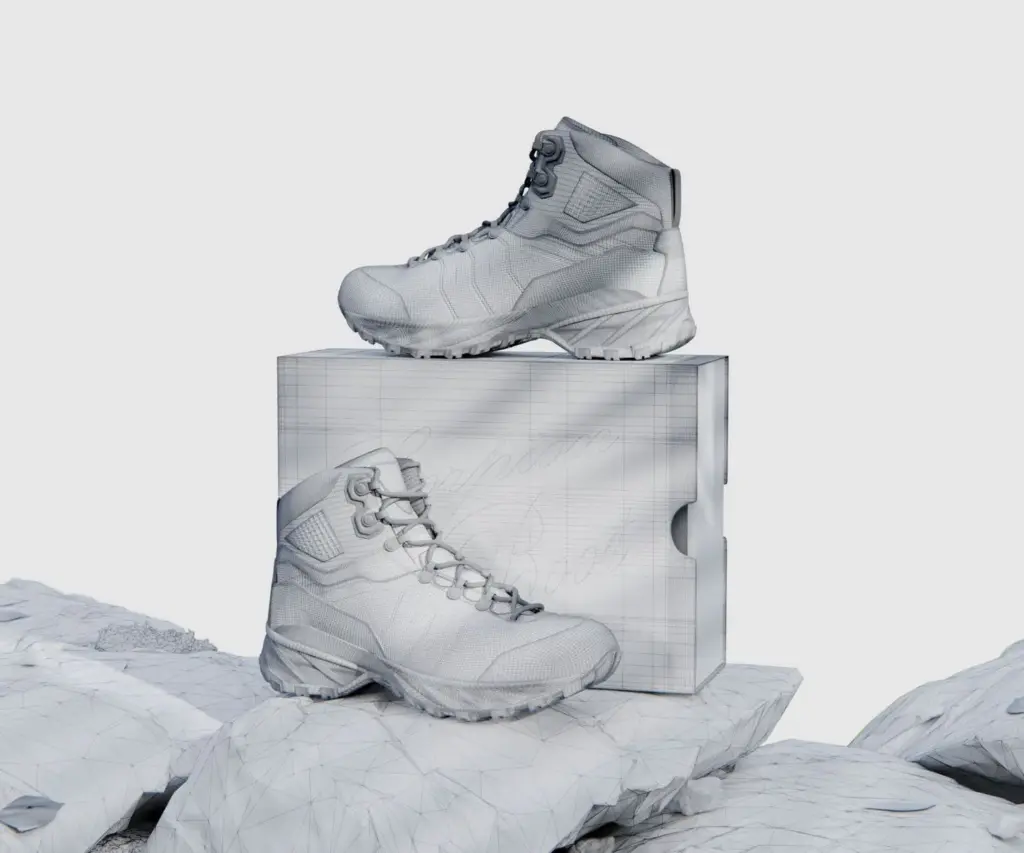
Build a single high-fidelity 3D master per SKU, then export platform-specific derivatives from it, rather than producing images or models per marketplace.
One master asset feeds every downstream deliverable:
- the pure-white main render for Amazon, Wayfair, Walmart, and Target
- the lifestyle room sets for secondary slots
- the optimized GLB for AR
A workable production sequence
- Model the piece once at full detail as a high-poly master from CAD files or reference photos.
- Render the compliant main image: pure white, RGB 255,255,255, 2,000px square, 85% frame fill.
- Render lifestyle and scale variants from the same scene for secondary slots.
- Retopologize and bake to a low-poly mesh for the AR GLB, under 20,000 triangles and 5 MB for Amazon.
- Export platform derivatives (GLB, USDZ) and re-crop where a channel demands a non-square ratio.
- Run the pre-upload compliance checklist per marketplace before bulk submission.
Do not assume a compliant square main image drops into every channel untouched.
Keep the master flexible enough to re-export, not just re-upload.
Managing high-poly masters, marketplace-specific renders, and AR-optimized GLBs across a large furniture catalog is a pipeline problem, not a design problem.
It is the work we structure at orbe3d and the reason a build-once approach beats commissioning assets per platform.
The rejection triggers that quietly suppress furniture listings
Most furniture listing rejections come from four causes:
- an off-white background
- too much empty frame
- forbidden overlays on the main image
- low resolution
Background is the dominant failure.
Soft edge shadows on upholstered pieces and slightly warm-toned wood finishes are the usual furniture culprits.
The full rejection-trigger list
- Background not exactly RGB 255,255,255, including off-white, cream, light gray, or shadowed corners.
- Product too small in the frame. Amazon flags fills under 85%.
- Text, badges, “sale” stickers, watermarks, or logos on the main image.
- Resolution below the platform floor.
- Transparent PNG converting to a black background on upload.
- For 3D assets, a unit-scale error or a triangle count over budget fails at review.
The two-minute pre-flight check
- Sample the four corners of every main image. Confirm pure white.
- Confirm 85%-plus frame fill and a thin margin only.
- Confirm no text, logo, prop, or watermark on the main.
- Confirm resolution meets the strictest target (2,000px square).
- Confirm file format and size caps per channel.
Future-proofing for AI Overviews and LLM shopping
Rich, spec-compliant image and 3D data are becoming a discovery signal for AI shopping agents, not just a compliance requirement for marketplace search.
Retailers building complete, structured product data today are positioning for how product discovery works as LLM-driven shopping matures.
This reframes the whole exercise.
Meeting furniture rendering image requirements for marketplaces is table stakes for staying listed.
Building a clean, reusable, richly structured 3D and image library is what makes your catalog legible to the AI layer sitting on top of those marketplaces.
Two practical moves that compound:
- Keep your 3D masters and metadata complete and consistent.
- Treat structured product data (dimensions, materials, finish attributes) as part of the image deliverable.
Source: automatedcommerce.ai, Retail Technology Innovation Hub (2026).
Furniture Rendering Image Requirements for Marketplaces
We’ve seen that marketplace image requirements can become a costly bottleneck when furniture teams treat compliance as an afterthought. A single background, resolution, or framing issue can delay a listing, waste production time, and push a launch behind schedule.
The key is to build your 3D assets around marketplace specifications from the start. The right workflow lets one master asset produce compliant images for Amazon, Wayfair, Walmart, and other channels without rebuilding the product for every platform.
If you’re still checking requirements manually, start with a free trial and test your workflow before scaling your catalog.
Grab your free trial and see how a marketplace-ready 3D workflow can simplify your next furniture launch.
FAQ
Q: What size should Amazon furniture renders be?
At least 1,000px on the longest side; 2,000px square is recommended.
Q: Does Amazon require a white background?
Yes. Use a pure white RGB 255,255,255 background for the main image.
Q: What size does Wayfair recommend?
Wayfair recommends 2,000 × 2,000px, with 1,000 × 1,000px as the minimum.
Q: Can 3D renders replace furniture photography?
Yes, where the marketplace and product category allow rendered imagery.
Q: Can one render work across all marketplaces?
Not always. Platform-specific crops or adjustments may be required.