Furniture photoshoots drain budgets and buckle the moment your catalog scales.
After building 3D visualization workflows for furniture and e-commerce brands at Orbe3D, we’ve watched teams pay for the wrong model. Choosing between furniture rendering pricing models shouldn’t be a guessing game.
Here’s what most buyers miss. Per image looks cheap until your SKU count explodes. Subscriptions look efficient until utilization drops. The math shifts with volume, refresh cycles, and turnaround speed.
We’ve helped brands cut visual production costs by 40% by matching pricing structure to real output, not sales pitches. Our job here is guide, not vendor.
In this guide, you will solve your rendering cost problem with:
- A clear breakdown of per image, per SKU, and subscription models
- A framework matching each model to your catalog size and refresh rate
- Red flags that signal you’re overpaying
Based on 35+ studio quotes, three years of campaign data, and our internal production data.
Key takeaways:
- Furniture rendering pricing is two costs, not one. You pay once to build the 3D model, then a smaller amount per render it produces. Read every quote through that split.
- Per SKU, not per image, is the number that governs a catalog budget. The first image carries the modeling; each later variant is a discounted re-render, which is why a 60-SKU catalog costs far less than 60 times the single-image price.
- Your crossover to 3D is driven by configuration options, not raw SKU count. A 50-product line with 20 fabric options each is up to 1,000 photography shots but only 50 archetypes in 3D. Most furniture brands break even around 15 to 25 SKUs.
- Per image fits small, fixed jobs (under ~15 images). It is predictable but punishes scale, and you forfeit the 10 to 25 percent volume discount that comes from reusing one model.
- Subscription fits steady monthly output, not seasonal spikes. It is cheapest at high utilization and wasteful the moment capacity goes unused. It is the mirror risk of per image.
- Locked variant lists and clean CAD files protect your rate under every model. Drip-feeding a catalog SKU by SKU reopens setup work and quietly raises the total.
- The model you pick decides how much of 3D’s cost advantage you keep. 3D runs roughly 40 to 80 percent cheaper than traditional photography, so the wrong pricing structure erodes savings you already earned.
How furniture rendering pricing models calculated: per image vs per SKU vs subscription
Published per-image rates for furniture rendering run from roughly $70 a view to well past $1,500. According to Orbe3d, product and lifestyle scenes sit around $70 to $95 per view.
The same category runs $150 to $1,500 and up. That gap is not sloppiness. It is a sign that the per-image number tells you almost nothing on its own. What decides your actual spend is the pricing model and how that model meters the work.
This guide breaks down the three models buyers actually choose between, shows how each is calculated, prices the same 60-SKU catalog three ways, and gives you a matrix for picking the right one.
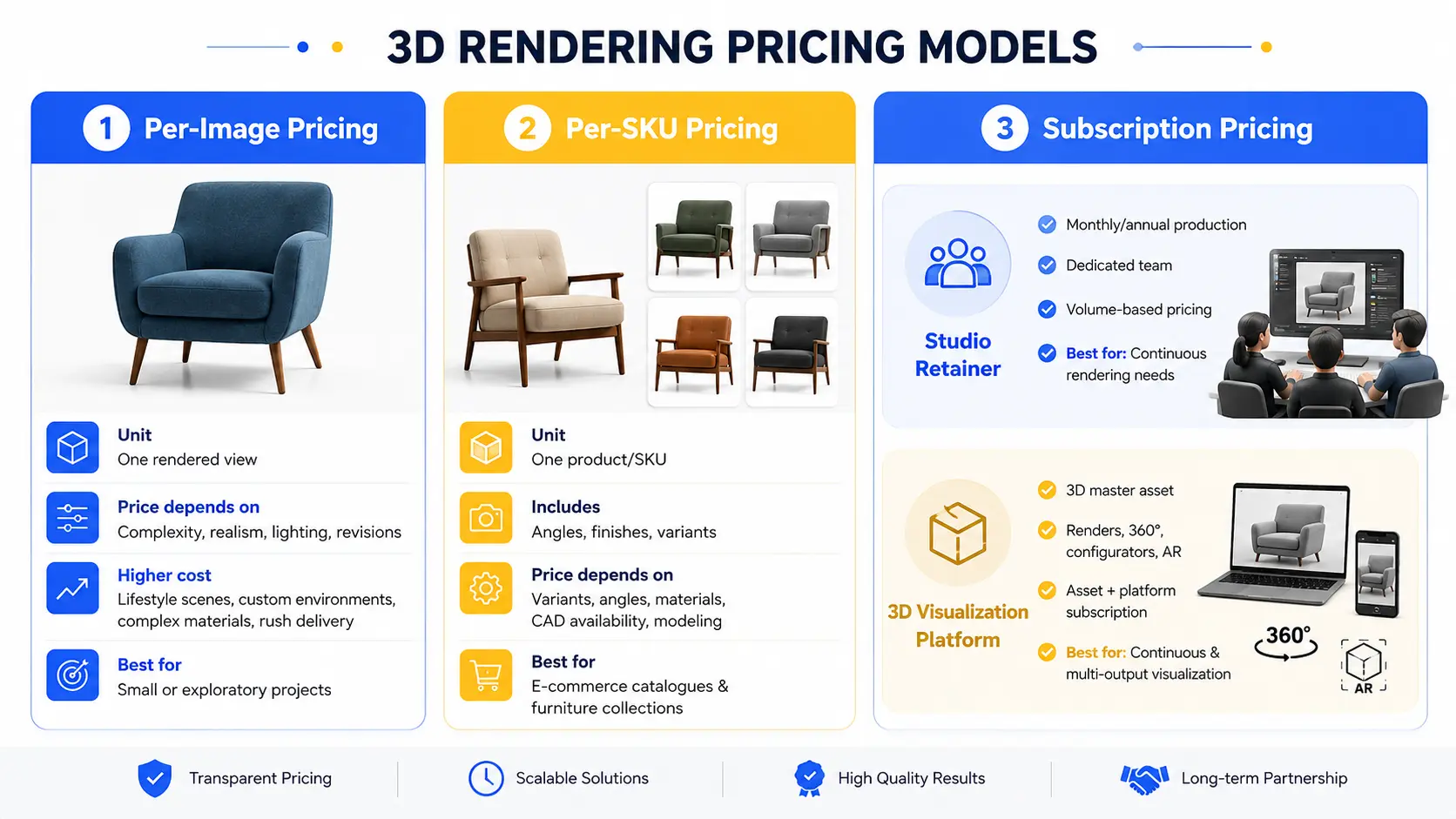
There are three pricing models for furniture rendering, and each wins in a different situation:
- Per image, bills each rendered view. Best for one-off shots and small, undefined jobs where scope is not fixed.
- Per SKU (per variant) bills the product, with the first render carrying the 3D modeling and each color or fabric variant priced at a fraction. Best for a fixed catalog batch.
- Subscription covers ongoing output for a flat recurring fee, either as a studio retainer or a 3D platform license. Best when you refresh often or need interactive assets like configurators, 360 spins, and AR.
The rule of thumb: pay per image when scope is unknown, per SKU when the catalog is fixed, and subscription when the work is continuous or the assets need to live on your site.
Not Sure Which Pricing Model Fits? Get a Free Consultation
Not sure whether per-image, per-SKU, or subscription pricing is right for your furniture catalog? Get practical guidance from an experienced 3D artist based on your products, volume, and rendering needs.
Why furniture is priced per variant, not per image
The single most useful thing to understand about how furniture rendering pricing is calculated is that the real unit of cost is the SKU variant, not the image.
The first image of any SKU carries the expensive part: geometry built from drawings, fabric and wood material setup, and lighting.
According to industry insight, once that master scene exists, a new colorway, fabric, or hardware finish is a material swap and a re-render, quoted at a fraction of the first image’s price rather than at the full rate. This is why a 60-SKU catalog costs far less than 60 times the single-image price.
Two inputs move a furniture quote more than render style does:
- Whether usable CAD files or dimensioned drawings exist. Missing geometry means the studio models from scratch, which is the biggest line item.
- Whether the variant list is locked before production. According to market news, drip-feeding the same catalog SKU by SKU costs more than quoting it as one batch.
Keep both in mind as you read the three models below, because they change the math under every one of them.
1. Per-Image Pricing
The unit: One rendered view.
How it is calculated: A base rate is determined by scene complexity, realism, lighting, and revisions. The rate is then multiplied by the number of images.
White-background product shots generally cost less, while lifestyle scenes, custom environments, and highly detailed materials require more production work.
What drives the price up:
- Photorealistic lifestyle scenes
- Custom environments
- Complex materials such as glass, metal, and upholstery
- Additional revisions
- Faster turnaround times
When it fits: Per-image pricing works well for exploratory projects, a small number of specific views, or projects where the final scope is not yet defined. You pay for the images you need without committing to a larger catalog package.
2. Per-SKU Pricing
The unit: One product or SKU, usually with a defined number of angles and finish variants.
How it is calculated: The first render of an SKU typically includes the 3D modeling and asset preparation. Additional color or material variants can then be created by swapping finishes and re-rendering the existing model.
A per-SKU package may include multiple angles, color variations, or close-up views. This makes it particularly suitable for e-commerce catalogs and furniture collections.
What drives the price up:
- Number of finishes or colour variants
- Number of viewing angles
- Complex surfaces and materials
- Whether CAD or other source geometry is available
- Additional modelling requirements
When it fits: Per-SKU pricing works best when you have a defined catalog with a known number of products and variants. For furniture retailers and manufacturers launching a collection, it can make budgeting and production planning easier.
3. Subscription Pricing
Subscription pricing generally falls into two different models, and they should not be treated as the same.
Studio Retainer
A studio retainer uses a fixed monthly or annual fee for an agreed production volume, often with a dedicated team.
This model can make production more predictable and reduce the effective cost per image when you need renders regularly.
How it is calculated:
The fee typically depends on factors such as
- Monthly image or SKU volume
- Number of modelling hours
- Required turnaround time
- Number of revisions
- Dedicated team or account support
When it fits: A studio retainer is suitable for brands with continuous rendering needs, regular catalog updates, or a steady stream of new products.
3D Visualization Platform Subscription
A platform-based model works differently. A reusable 3D master asset is created for each SKU, which can then support multiple outputs such as renders, product configurators, 360° viewers, room scenes, and AR experiences.
How it is calculated:
The cost usually combines a one-time asset creation fee with a recurring platform subscription. Pricing can depend on catalog size, rendering volume, required features, and the number of products managed on the platform.
Once the master asset exists, creating additional views or variants can require significantly less production work than creating each image from scratch.
When it fits: This model is best for businesses that need continuous product visualization, frequent product updates, interactive experiences, or multiple outputs from the same 3D asset.
Get a Free 3D Rendering Trial
Experience the quality of our furniture rendering before you commit.
Studio vs platform: two different cost structures
The per-image and per-SKU models are usually a rendering-studio relationship. A subscription can be either a studio or a platform. The distinction matters because it changes what you are actually buying:
Type | Studio (per image / per SKU) | Platform (subscription license) |
Spend type | Project cost (OpEx per job) | Asset build (CapEx) plus recurring license |
You receive | Finished images | A reusable 3D master asset plus tooling |
Reuse | Reorder or re-quote each time | Unlimited renders, 360, AR, configurator from one asset |
Marginal cost of variant #4 | Priced per swap | Near zero after build |
Best channel fit | Catalog and campaign imagery | Always-on PDP, configurator, and omnichannel |
A studio is the right call when you need images. A platform is the right call when you need an asset that keeps producing images, spins, and AR across channels without re-quoting each time.
The same 60-SKU catalog, priced three ways
The following is an illustrative example using midpoint market rates from the sources above. Real quotes vary with geometry availability, complexity, and revisions. Assume 60 SKUs, each needing one white-background packshot plus three color variants, so four images per SKU and 240 images total.
Model | How it computes | Illustrative total (year 1) |
Per image (a la carte) | 240 images at about $120 each, little reuse credit | ~$28,800 |
Per SKU (variant reuse) | ~150firstrenderwithmodeling,plus3variantsat~35 each, per SKU: ~$255 x 60 | ~$15,300 |
Platform subscription | 15,000, plus annual license (~$12,000 to $30,000) covering unlimited output, 360, AR, configurator | ~$27,000 to $45,000 |
Read the pattern, not the exact figures:
- Per SKU beats naive per image by roughly 45 to 50 percent on a fixed catalog, entirely because of master-scene reuse.
- Subscription looks most expensive in year one because you are buying reusable assets and tooling, not just images. Its advantage shows up in year two and beyond, when the marginal cost of new variants, seasonal scenes, and channel reuse approaches zero.
That last point is the real break-even question, covered next.
Break-even: when to switch models
Map your situation on three axes. Where they land tells you the model.
Situation | Catalog size | Variant density | Refresh cadence | Recommended model |
A few hero shots, scope unclear | Small (<20) | Low (1 to 2) | One-off | Per image |
Collection launch, list locked | Mid to large (20 to 100+) | Any | One-off or seasonal | Per SKU |
Growing catalog, frequent variants | Large (100+) | High (3+) | Continuous | Subscription (studio retainer) |
Needs configurator, 360, or AR on site | Any | High | Continuous | Subscription (platform) |
Two switch signals worth calling out:
- From per image to per SKU: the moment your variant list is fixed and you can batch. Orders of 30-plus images commonly earn a 25 to 40 percent volume discount, which is the batch effect made explicit.
- From per SKU to subscription: when annual re-render and new-variant volume is high enough that a flat rate beats repeated per-job quotes or when you need the asset interactive on your storefront. If the assets only ever ship as static images and you refresh once a year, a platform license is usually overkill.
Hidden costs each model buries
The sticker rate is not the invoice. Budget for these before you commit.
Model | Costs that show up later |
Per image | Revision-round caps, scope-change re-quotes, per-image minimums, no reusable asset at the end |
Per SKU | Modeling surcharge when CAD or drawings are missing, higher cost if you drip-feed instead of batching; first-render modeling premium |
Subscription | Onboarding and asset-build ramp, annual commitment, per-render or per-config metering above your tier, integration and dev time, asset portability if you leave the platform |
On revisions specifically: confirm how many rounds are included and what a change of scope triggers. Fixed pricing covers the agreed scope, and a significant mid-project change produces a revised quote rather than free work.
How to choose: a five-question checklist
Run your project through these before you request quotes. They surface the exact inputs that move a furniture rendering price.
- How many SKUs, how many variants per SKU, and is the list locked?
- Do you have usable CAD files or dimensioned drawings, or does the studio model from scratch?
- How often will you refresh or add variants each year?
- Do you need static images only, or interactive assets (configurator, 360, AR)?
- Across how many channels will the same asset be reused?
More SKUs, locked lists, and existing geometry push you toward per SKU. High refresh cadence and interactivity push you toward subscription. An undefined scope keeps you on per image until it is defined.
FAQ
Q: How is furniture rendering pricing calculated?
It depends on the pricing model: per image, per SKU, or subscription.
Q: What is the difference between per-image and per-SKU pricing?
Per-image pricing charges for each view, while per-SKU pricing charges for the product and its variants.
Q: Is subscription rendering cheaper than per-image pricing?
Not always. It can become more cost-effective for frequent, high-volume projects.
Q: Why do furniture rendering quotes vary between studios?
Costs vary based on modeling, variants, image volume, realism, and project complexity.
Q: For a large catalogue, is a studio or platform cheaper?
A studio may suit one-time static images, while a platform can be better for ongoing interactive content.
Q: Does per-image pricing include revisions?
Usually, but the number of included revisions depends on the provider and project scope.
Conclusion: Choose the Right Furniture Rendering Pricing Model
We’ve seen how choosing the wrong furniture rendering pricing model can quietly increase costs across a large catalog. A per-image contract may seem simple, but for a 200-SKU catalog with multiple variants, a per-SKU or subscription model can offer better long-term value. The hard lesson is that the cheapest quote is not always the lowest total cost.
Delaying that decision can mean paying unnecessary a la carte rates every time you add a new color, finish, angle, or product.
There’s a simpler way to find the right fit. Start our free trial and build your first SKU assets before committing to a larger project. You’ll see how your actual modeling, variant, and rendering requirements affect the cost.
Start your free trial today and calculate your real per-variant cost before you commit.